

Most people assume that deleting a recording removes it for good. That assumption is wrong, and understanding how wiping recordings protects safety is more urgent than most people realize. A deleted file does not disappear from your device. It sits there, recoverable, until something permanently overwrites it. For anyone facing a threat from someone with access to their phone or computer, that gap between "deleted" and "gone" can have serious consequences. This article covers what actually happens when you delete a recording, which wiping methods work, and what steps protect your personal data for real.
Table of Contents
- Key takeaways
- How wiping recordings protects safety by removing recoverable data
- Wiping standards and methods that actually work
- Securely erasing audio and video recordings
- Practical steps to wipe recordings and protect yourself
- Common mistakes that leave recordings exposed
- My perspective on wiping as a safety practice
- How Quickshield-call handles the privacy purge problem
- FAQ
Key takeaways
| Point | Details |
|---|---|
| Deletion is not erasure | Removing a file only deletes its pointer; the actual data stays on the device until overwritten. |
| Wiping standards vary | NIST 800-88 defines three levels: Clear, Purge, and Destroy, each suited to different threat levels. |
| Encryption accelerates safe deletion | Encrypted devices can be wiped reliably by destroying the encryption key, making data unrecoverable. |
| Cloud backups extend the risk | Wiping a local device means nothing if the same recordings exist in a cloud backup. |
| Documentation proves compliance | A certificate of destruction protects you legally and confirms the wipe actually happened. |
How wiping recordings protects safety by removing recoverable data
When you tap "delete" on a recording, the operating system removes the file's directory entry. That entry is the pointer that tells the system where the file lives on the storage medium. The data itself remains on the drive until new data physically overwrites that space. Recovery tools can find and restore those files in minutes.
This is not a theoretical risk. Anyone with physical access to your device and a free recovery application can pull back recordings you thought were gone. That includes an abusive partner, a stalker, a thief, or anyone else who gets hold of your phone. The threat is direct and practical.
The risks that follow from recoverable recordings include:
- Identity exposure. Voice recordings can reveal personal details, account numbers, or security answers spoken aloud during calls.
- Location tracking. Video recordings often contain metadata with GPS coordinates and timestamps.
- Behavioral profiling. A series of recovered recordings can map your routines, relationships, and vulnerabilities.
- Stalking and harassment. Audio or video evidence of private conversations gives an abuser material for coercion.
Factory resets create a false sense of security. Many people believe a factory reset wipes a device clean. On unencrypted Android devices, a factory reset without prior encryption leaves data recoverable through standard forensic tools. The data persists on the storage chips until it is physically overwritten or the encryption key is destroyed.
Pro Tip: Before selling, donating, or discarding any device that stored recordings, verify the wipe with a recovery tool. If the tool finds anything, the wipe was incomplete.
Wiping standards and methods that actually work
Not all wiping is equal. The National Institute of Standards and Technology published NIST 800-88, which defines three sanitization levels: Clear, Purge, and Destroy. Each level addresses a different threat environment.
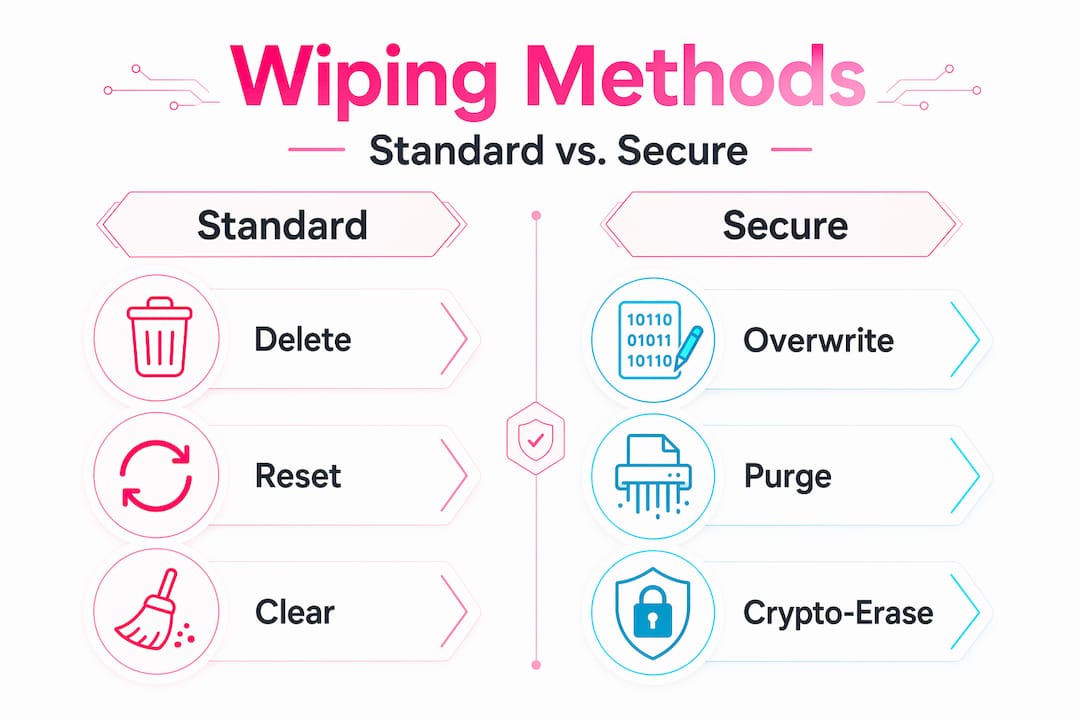
| Method | What it does | Best for |
|---|---|---|
| Clear | Overwrites data using standard read/write commands | Devices leaving low-risk environments |
| Purge | Uses firmware commands or cryptographic erase to remove data beyond recovery | Devices with sensitive personal or regulated data |
| Destroy | Physical destruction to particle sizes below 2mm | High-confidentiality data with no device reuse |
The "Clear" level is sufficient for devices that never held sensitive recordings. For anyone protecting personal data, health information, or safety-related audio and video, the "Purge" level is the minimum acceptable standard.
Standard software overwriting has a critical limitation on modern drives. SMR drives use overlapping track architecture that causes read-modify-write cycles during overwrites, leaving recoverable fragments behind. The only reliable method for these drives is a firmware-level purge command. SSDs present a similar challenge because of wear-leveling algorithms that redirect writes to different memory cells, meaning a targeted overwrite may never reach the original data location.
Cryptographic erasure solves this problem on encrypted devices. When a device uses full disk encryption, destroying the encryption key renders all stored data permanently unreadable. This is the fastest and most reliable wipe method for modern smartphones and SSDs.

Legal compliance adds another layer of obligation. GDPR requires permanent, documented deletion of personal data. Deletion alone does not satisfy this requirement. Certified erasure with an audit trail does. HIPAA carries similar requirements for health-related recordings. A certificate of destruction that records the date, method, and device serial number is the standard proof of compliance in both legal and regulatory contexts.
Pro Tip: Request a certificate of destruction from any professional data destruction service. Without it, you have no documented proof that the wipe happened.
Securely erasing audio and video recordings
Audio and video files carry more sensitive information than most people account for. A single voice memo can contain a home address, a financial account number, or a description of a daily routine. A video call recording can identify faces, locations, and relationships. Simple deletion is insufficient for these file types under GDPR or HIPAA, and it is insufficient for personal safety as well.
Two approaches apply here: redaction and full file erasure.
- Automated redaction uses AI tools to identify and mask sensitive segments within a recording without deleting the entire file. This is useful when parts of a recording must be preserved for legal or professional reasons while other parts contain identifying or dangerous information.
- Full file secure erasure removes the entire recording using a Purge-level method. This is the right choice when the recording has no further legitimate purpose.
- Audit-ready documentation matters even for personal use. Keeping a log of what was deleted, when, and how provides a record if questions arise later.
- Data minimization before storage reduces the problem at the source. Trimming or redacting recordings before saving them limits the amount of sensitive material that needs to be managed or erased later.
The principle behind data minimization is straightforward: data that never gets stored cannot be recovered. If a recording contains sensitive personal information that is not needed for any future purpose, the safest practice is to not save it at all, or to trim it immediately before storage.
Practical steps to wipe recordings and protect yourself
Taking control of your recordings requires a few specific actions. These steps apply to personal devices and cover the most common threat scenarios.
- Enable full disk encryption now. On iPhone, encryption is on by default. On Android, go to Settings, Security, and enable encryption before performing any wipe. This single step makes every future deletion far more secure.
- Use remote wipe for lost or stolen devices. Remote wipe can be triggered through a web panel, restoring a device to factory state before anyone accesses its recordings. Enable Find My (iOS) or Find My Device (Android) in advance. You cannot set this up after the device is gone.
- Use verified wiping software for computers. Tools like Eraser (Windows) or Secure Empty Trash (macOS) overwrite deleted files. For full drives, use DBAN or manufacturer-provided secure erase utilities.
- Verify the wipe with a recovery tool. After wiping, run a recovery application to confirm nothing is retrievable. If files surface, repeat the process or escalate to a Purge-level method.
- Delete cloud backups explicitly. Wiping a local device does not remove recordings stored in iCloud, Google Drive, or any other backup service. Log into each service and delete recordings there as well. Failure to erase backups creates recovery risk even after a thorough local wipe.
- Keep a deletion log. Record what you deleted, the method used, and the date. This takes two minutes and provides documentation if you ever need to demonstrate that a recording no longer exists.
Pro Tip: If you are in a situation where someone has access to your device and you need to wipe recordings quickly, a pre-encrypted device with remote wipe already enabled is the only option that works under time pressure.
Common mistakes that leave recordings exposed
Even people who take wiping seriously make errors that leave data recoverable. These are the most frequent ones.
- Relying on factory reset without encryption. A factory reset on an unencrypted device does not reliably destroy data. Always encrypt before resetting.
- Deleting files instead of wiping. Moving recordings to the trash and emptying it is not a wipe. The data remains on the drive.
- Ignoring cloud copies. Most phones back up automatically. A local wipe paired with an intact cloud backup accomplishes nothing from a safety standpoint.
- Overlooking encryption key extraction. On some devices, encryption keys can be extracted through forensic tools if the device is not properly wiped after encryption is enabled.
- Skipping documentation. Without a certificate of destruction or deletion log, there is no proof the wipe occurred. This matters in legal situations and for personal accountability.
My perspective on wiping as a safety practice
I have watched people go through the process of believing they were protected because they deleted something, only to find out later that the data was still there. The gap between assumed privacy and actual security is where real harm happens.
What strikes me most is that wiping recordings is not primarily a technical problem. It is a behavioral one. The technology to wipe data permanently has existed for years. What fails is the habit of using it consistently, verifying it worked, and accounting for every copy of the data, including backups.
The "trust but verify" principle applies directly here. Running a wipe tool without verification is the same as locking a door without checking the handle. The action feels complete but the outcome is unconfirmed.
My advice is this: treat every sensitive recording as a liability the moment it is no longer needed. Delete it using a verified method, check that it is gone, and remove any backup copies. That sequence takes less time than most people think, and it closes the gap between feeling safe and being safe.
— I
How Quickshield-call handles the privacy purge problem

Quickshield-call addresses the full picture of personal safety, including the moment when the threat is someone with access to your device. The privacy purge feature wipes recordings, messages, and location data on command. No manual steps through settings menus. No forgotten backup copies left behind. The wipe executes when it needs to, without drawing attention to the action. For anyone who needs to protect personal data under time pressure, that speed and simplicity matters. Visit Quickshield-call to see how the full safety system works, including location alerts, panic mode, and the privacy purge feature built into one app.
FAQ
What does wiping a recording actually do?
Wiping a recording overwrites the underlying data so recovery tools cannot reconstruct it. Simple deletion only removes the file pointer, leaving the data intact on the storage medium.
Is a factory reset enough to erase recordings safely?
A factory reset on an unencrypted device does not reliably destroy recordings. Encrypting the device first and then resetting it is the reliable method, as the reset destroys the encryption key.
How do I delete recordings safely from my phone?
Enable full disk encryption, then perform a factory reset or use a remote wipe. Also delete any cloud backups manually, since local wipes do not affect recordings stored in cloud services.
Does GDPR require more than just deleting recordings?
Yes. GDPR mandates certified, documented erasure that proves data was permanently removed. Standard deletion does not satisfy this requirement.
Why do cloud backups matter when wiping recordings?
Cloud backups store independent copies of your recordings on remote servers. Wiping a local device leaves those copies intact and fully accessible, which defeats the purpose of the local wipe.